The Busy Creator Podcast, episode 55 with Designer & Illustrator Nate Voss

The Busy Creator 55 w/guest Nate Voss

Nate Voss (@Vossome) has lived numerous lives as a designer and creative. First a traditional graphic designer, he spent several years as a freelance illustrator and designer before joining digital marketing & advertising agency VML. Since then, he’s moved into mobile and app design, exploring software development workflows and agency culture up close.

Our conversation meanders across a variety of topics, discussing the transition from agency life to freelance (and back), the culture shock of working in a large organization, and even the type of architecture that best suits a mixed team.

Listen Now

Read more

The Busy Creator Podcast, episode 54 - The Art of Work with Jeff Goins

The Busy Creator 54 - The Art of Work w/Jeff Goins

Jeff Goins (@JeffGoins) is the author of a new book titled The Art of Work. In researching the book, Jeff discovered the subject is bigger than a book, and has already moved into creating a movement, branching out to online communities and training to help people find their calling at work and in life.

Our conversation discusses the origins of the The Art of Work, the trouble creative pros face at work, and some of his writing methodologies. Catch up with Jeff on his many social media platforms or via website, GoinsWriter.com.

The Art of Work is available now in print and digital formats (Kindle, ePub, PDF) and will be available soon as an audiobook. Check out ArtOfWorkBook.com for all info.

Listen Now

Read more

The Busy Creator Podcast, episode 53 with Designer, Developer & Entrepreneur Matt Keefe

The Busy Creator 53 w/guest Matt Keefe

Matt Keefe (@MKeefe) is a multitalented designer & developer, and the co-founder of PixelBit, a design and development agency. PixelBit has no particular home base, with staff spread out all over the world. Managing this requires systems and good communication, which Matt discusses in this conversation.

We also cover tools and methodologies that change over time, sometimes very quickly, balancing client needs with constraints of deadlines and technology, and leaving life as a freelancer for one of a business owner.

Listen Now

Read more

Software Tools For Designers to Stay Organised and Focused

Software Apps I use to stay organised

A version of this article first appeared as a guest post on Just Creative Design. The original post and its comments can be found here.

Over the years, friends and colleagues in the design industry have come to know me as a rather organised person, one who enjoyed being a systems geek. I test a lot of software and methodologies, and have become somewhat of a go-to resource. I am often asked about the tools and techniques I use to run my own design practice, Starship Design, and my podcast, The Busy Creator.

Like many creative pros these days, I work solo, which allows me to be super-nimble and to test different systems with minimal overhead and training. Below is a run-down of what I’m currently using, and what might be worth an exploration for you or your small team.

TeuxDeux

TeuxDeux is a site to keep track of your daily to-do items

TeuxDeux sorts items by day

TeuxDeux is my to-do app of choice. I track daily tasks for both business and personal, and jot down long-term items which might otherwise escape my brain. It’s a great place to apply Getting Things Done methodology, as you can create different categories and lists. To-do lists are generally quite personal, so I don’t mind that TeuxDeux isn’t built for team sharing use.

Platform: web, iOS;
Price: $2/mo.

Harvest

A report in Harvest

Harvest tracks billable time and expenses

Harvest is my time-tracking app. When I worked freelance, it was a lifesaver, allowing me to record my efforts and create invoices. Acknowledging the ongoing controversy about hourly vs. flat-rate pricing, I have found that tracking hours and tasks helps keep me super-organized, even on flat-rate projects, and helps me understand where my focus has been during the week. Over the last 5 years in using Harvest, and have expanded my use from simple stop-watch billing purposes to handling all my invoicing and expense tracking. In the past, I’ve had freelancers and co-workers join my Harvest account so we can review in aggregate how the team is spending our time and where we should direct our efforts.

Platform: web, Mac, iOS, & Android;
Price: freemium

Freedcamp

Freedcamp dashboard screenshot

Freedcamp dashboard lets you manage projects and see updates

Freedcamp, as the name implies, is like a free version of Basecamp, and my project management suite of choice lately, especially for managing podcast’s weekly workflow. Freedcamp is great at allowing me to build checklists and templates, which I depend on for recurring items like the podcast. There’s also an emphasis on conversation, allowing comments on each task within each project, making it great for email replacement and organised reviewing of projects. With premium add-ons available, Freedcamp can become quite a full-featured package and replace a number of the individual titles you may use. Recent updates have introduced a more-visual interface like you see in Trello or KanbanFlow. More, I suspect, will come in time as the product matures and the development team grows.

Platforms: web;
Price: free with paid add-ons

Google Apps/Drive

Google Drive directory structure

Managing files in Google Drive for Starship Design and The Busy Creator

Google Apps/Drive is where I store the majority of my files for both Starship and The Busy Creator. I use Google Sheets to track my projects and to keep an ongoing list of all my tools, techniques, and habits discussed in the podcast. Drive allows me to have access to files on all my devices, which is a huge bonus. Many small businesses and corporations alike will opt for Google Apps because it brings the Gmail interface to their own domain name, but this has never been a huge priority for me. Still, having email, documents, calendars, and shared storage all bundled together make it a great service.

Also, if anyone is thinking about signing up, just leave a comment on this blog post and I can offer you a coupon.

Platforms: web, iOS, Android, Windows mobile;
Price: from $5/user/mo.

Dropbox

Dropbox interface

Dropbox is still a great online storage tool

Dropbox still has its place, even though I prefer Google Drive for most things. In my opinion, Dropbox is better for tracking versions of individual files, a need I might encounter for a design project. Should I have to roll back to yesterday’s PSD, for example, I know things are taken care of. I also love the “Drag-and-Dropbox” feature that is part of my desktop email client of choice, Postbox. This allows me to quickly email a link to a file on Dropbox without having to invite the recipient to Google, give them access, create a big link, etc. etc. In general, I feel Dropbox is better at sharing individual files via links, but Google Drive is more of a common base for your whole team.

Platforms: web, Mac, Windows, iOS, Android, Blackberry, Kindle;
Price: free for personal, from $15/user/mo. for business

WaveApps

WaveApps dashboard with graphics

WaveApps dashboard gives great summaries and info at a glance

WaveApps, is a great, free accounting app. Previously, I didn’t even have an accounting app, but instead recorded my charges in Apple Numbers and compared that to the bank statements that arrived each month. Clearly, this is a huge step up. It’s free, and the feature set fits me great considering I’m still a very small business; all I need is invoices, expenses, and an overview of my accounts. If you have a money person on your team, he or she should definitely take Wave for a spin and see if it’s a good fit.

Platforms: web, iOS;
Price: freemium

Cushion

Cushion screenshot

Cushion represent projects in a visual way, unlike most project management apps

Cushion is a new online tool for tracking your project progress and mapping your schedule visually. The visual approach to project management allows me to quickly determine which projects started promptly and finished succinctly with a paid invoice, and which projects dragged on and took forever to conclude. Cushion is emerging from Beta, so see if you can get on board early. Check out the Cushion blog for more details.

Platforms: web;
Price: $8/mo.

Brandisty

The Busy Creator on Brandisty.com

The Busy Creator on Brandisty.com

About a year ago, I got connected with an young service called Brandisty, which allows you to save your brand assets online and make them available. This is extremely helpful for maintaining in-house standards for colour and logo usage, and making them easily sharable with members of the press or partner agencies. Most small businesses don’t have the time, energy, and expertise to build and maintain a separate area of their own site for this, making Brandisty a great choice. Need an example? Check out the Brandisty page for The Busy Creator.

Platform: web;
Price: freemium

Fragmentation

Adopting a nimble system of online software breeds immediate trouble with fragmentation. The online software space has exploded over the last ten years, and just about the only thing folks agree on is that there is no single, universal solution to solve the problems of every agency and individual. Fortunately, some bridges and solutions have emerged.

Many of the apps have APIs and plugins, allowing an official connection between apps. For example, you can connect Harvest with Basecamp, to track time on projects you’ve already created. Or you can use the Google Drive function on Freedcamp to link to stored files that everyone has access to. But unfortunately, not every development team is able to build compatibility with everyone else.

Luckily, tools like Zapier and IFTTT have emerged. These allow users to create actions between their online services and social networks. For example, a recipe might read something like “If I post a photo to Flickr with the company username, save it to Dropbox and then post it to Basecamp so my team can comment on it.” Both sites are worth some exploration. Zapier and IFTTT both run on the web, and are freemium and free, respectively. For a bit more polish, check out Taco, which is itself an online software tool aimed at wrangling the various online software tools.

Further Exploration

As a solo graphic designer, there are entire categories of business to which I am uninitiated, and obviously not an expert.

Sales and CRM tools are an equally popular space to project management. In fact, there are so many choices that a site called CRM Chooser has emerged to help you narrow down the options. For my use CRMs a bit overwhelming, but for a person or team that relies on systematic sales and business relationships, employing a CRM is a necessity.

For companies that utilise email marketing, an enterprise email service is needed. I use MailChimp to help spread the word about my podcast, but email marketing is not the focus of my business, and my own mailing list is modest. There are many email solutions that tie in closely with CRM systems, such as Infusionsoft, allowing companies to link the pieces together.

There is also a new industry of reporting and analytics. Since, online sales, web traffic, and social media engagement all need close monitoring in order to enable informed decisions, the software smiths of the world have created a number of really powerful tools to scratch the itch. I have discovered a few services like RavenTools and Domo, but these — and most others I’ve encountered — are beyond the scope of my small operation.

What do you use?

I’m always curious to hear what everyone else is using. Have you found something approachable and affordable that works for a small or solo operation? Is there a tool I’ve missed aimed specifically at designers or creative pros? Do you struggle from a similar overwhelm with all this new stuff? Let’s discuss in the comments.

Thanks to Jacob Cass from Just Creative for featuring me as a guest contributor.

The Busy Creator Podcast, episode 52 with Digital Marketing Strategist & Cooking Show Host Adrienne Stortz

Adrienne Stortz (@xoxoadrienne) is the creator and host of xoxo cooks, an online cooking show featuring good food you can make at home. She also consults on digital marketing strategy for classical musicians, helping them craft messaging and promote events.

Our conversation discusses the balance between client work and a passion project, how she arrived in both the classical music and online video sectors, and how the premise of experimentation and continual improvement can be powerful for freelancers and businesses alike.

Catch up with Adrienne on her xoxo cooks YouTube Channel, or on her consulting website, AdrienneStortz.com

Listen Now

Read more

The Busy Creator Podcast, episode 51 with Architectural Photographer Peter Kubilus

The Busy Creator 51 w/guest Peter Kubilus

Peter Kubilus (@PeterKubilus) is an interiors and architectural photographer based in metro New York. Following studies in both photography and architectural engineering, Peter has created a practice photographing offices, hotels, residences, and more.

Our conversation covers his origins in photography, how he came to specialise in architecture, and the workflow of setting up lights and creating his images.

Check out Peter’s photography at his website, kubilusphoto.com

Listen Now

Interior photography by Peter Kublius

Interior photography by Peter Kublius

Read more

The Busy Creator Podcast, episode 50 with Podcaster Entrepreneurs John Lee Dumas & Kate Erickson

The Busy Creator 50 w/guests John Lee Dumas & Kate Erickson

John Lee Dumas (@JohnLeeDumas) & Kate Erickson (@KateLErickson) are the duo behind Entrepreneur on Fire, a daily podcast about business, life, and success. Working closely and dedicating themselves to systematic behaviour, John and Kate have built a massively successful business around their podcasts and blogging community.

This conversation discusses their individual workflows and systems, how they manage virtual assistants, and how working from home requires discipline and systems.

Check out their podcasts, blogs, communities, and courses over at EntrepreneurOnFire.com

Listen Now

Read more

The Busy Creator Podcast, episode 49 - Salary & Fee Negotation with Jim Hopkinson

The Busy Creator 49, Salary & Fee Negotiation w/guest Jim Hopkinson

Jim Hopkinson (@HopkinsonReport) is the author of the book Salary Tutor: Learn The Salary Negotiation Secrets No One Ever Taught You. His website, SalaryTutor.com, offers free resources and online salary negotiation courses to help creative professionals, students, and freelancers increase their confidence, develop a negotiation mindset, and get paid what they’re worth through effective negotiation.

This conversation discusses how creatives can use their natural abilities to get the job, how to negotiate for a top salary or raise, and how freelancers can approach fee negotiations for project-based work.

Listen Now

Read more

The Busy Creator Podcast, episode 48 with Commercial Artist Eric Kass

The Busy Creator 48 w/guest Eric Kass

Eric Kass (@funnel_erickass) is a Commercial Artist who has built a distinct solo practice across identity, graphic design, packaging design, and more. His practice — Funnel, the Fine Commercial Art Practice of Eric Kass — works with startups and artisanal food companies on developing all aspects of their brand story.

Our conversation cover Eric’s definition of a commercial artist, how we works with clients, and his new side project. Catch up with Eric on his website, Funnel.tv

Listen Now

Read more

The Busy Creator Podcast, episode 47 with Digital Strategist & Author Lucy Leiderman

The Busy Creator 47 w/guest Lucy Leiderman

Lucy Leiderman (@Lucy Leiderman) is the Director of Digital Strategy for Toronto-based agency Pilot PMR. Here, she advises clients on content and social media strategy, oversees promotion and advertising across new media, and writes on a number topics related to internet and technology.

Lucy is also a published author, having written the Seven Wanderers Trilogy, a series of novels in the historical fiction/fantasy genre.

This conversation is split into two parts, where the first discusses her work as a digital strategist, and the second speaks more to her personal habits and her workflow as an author. Catch up with Lucy on her website, LucyLeiderman.com

Listen Now

Part I:

Part II:

Read more

The Busy Creator Podcast, episode 46 with Artist & Musician Lindsay Katt

The Busy Creator 46 w/guest Lindsay Katt

Lindsay Katt (@LindsayKatt) is a multi-faceted artist & musician based in New York. Her musical work spans several genres across the pop & rock sectors, in addition to work for television and film.

Our discussion meanders a bit on the nature of art, cycles and seasons of creative work, the songwriting process — if there is one — and how creative pros can possibly keep up with today’s wacky world of social media.

Keep up with Lindsay via her many social media outlets, or on her website, Lindsay Katt Music

Listen Now


Read more

Pro Tip for Using Google to Compare Software Tools

Compare using Google

On The Busy Creator Podcast, we frequently discuss the software that creative pros are using to build websites, edit videos, and manage projects. In fact, the most downloaded episode to date remains our single-topic show about project management tools & collaboration software.

If you’re researching new online software, web or mobile apps, or project management tools, don’t forget about using Google. Here’s how:

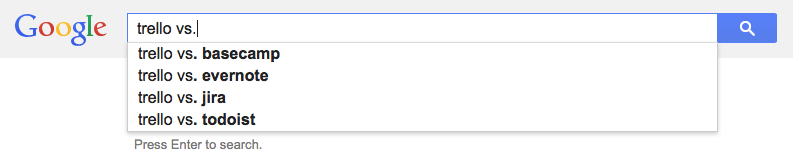
Many of us begin our discovery with another software title or company. For example, if you’re out there trying to learn the latest in word processing, you’ll likely have Microsoft Word as the standard by which to compare it. Google knows that you’re likely searching for competitors if you use the modifier "vs." after the proper name of a software title. In this particular case, you can type "Microsoft Word vs." and you’ll see competitors auto-populate.

Alternatives to Trello, according to the Google

Alternatives to Trello

This works great in the world of project management and productivity apps, where there is significant fragmentation and competition. Looking for alternatives to Basecamp? Try "Basecamp vs.". Looking for time-trackers like Freshbooks? Try "Freshbooks vs.".

You get the idea. This one is simple, but it’s a Pro Tip and you can start using it today. Next time a client or boss says “what are some alternatives?” You’ll be able to gather several names almost instantaneously — and no one has to know that!

PS, It also works with services like Monster.com or resources like iStockPhoto. Google is very smart. Maybe too smart.

The Busy Creator Podcast, episode 45 with Founder of Peritus Frank Truglio

The Busy Creator 45 w/guest Frank Truglio

Frank Truglio (@IamPeritus) is a serial entrepreneur and co-founder of a new website, Peritus.nyc, which connects creative pros to companies and agencies seeking talent. Peritus is unique in their use of technology, creating a detailed information profile for candidates in their database, and indexing creatives based on their characteristics and experiences.

In this conversation, Frank discusses the founding of Peritus, how his team used off-the-shelf software to quickly build their first version, and how he keeps thing organized while developing in sprints and working double shifts.

Listen Now


Read more

The Busy Creator Podcast, episode 44 with Food Photographer, Author, & Entrepreneur Taylor Mathis

The Busy Creator 44 w/guest Taylor Mathis

Taylor Mathis (@taylor_mathis) is a food photographer turned entrepreneur based in Charlotte, NC. Taylor has built an online following in the food photography industry, and authored several books. Lately, he’s turned to online entrepreneurship and helping fellow photographers earn steady income through his new venture and podcast of the same name, Business of Creatives.

This conversation covers his origins in photography, the challenges of shooting food, and how he transitioned into different business areas as a creative pro.

Check out Taylor on his sites, Photographing Food , Taylor Takes a Taste, and Business of Creatives, as well as his book, The Southern Tailgating Cookbook.

Listen Now


Read more

The Busy Creator’s Quick Guide to Starting a Podcast

The Busy Creator's Quick Guide to Starting a Podcast

I’ve been hosting The Busy Creator Podcast for over a year now, and the endeavor has allowed me to connect to 40+ amazing creative pros across a number of creative sectors. In recent weeks, numerous folks have approached me with the simple question “What do I need to start a podcast?” With growing interest not only in listening, but in hosting a podcast, I think it useful that I share some tips on getting started.

The important thing to note is that I am by no means an expert in creating a world-famous show, earning millions of dollars, building a full-fledged media company, or becoming a speaker/author/entrepreneur on the back of my humble podcast. Those things have indeed happened to Podcasters over the years — for example, Keith and The Girl, Entrepreneur on Fire, Grammar Girl/QD Now, or Chris Hardwick, respectively, but not for me [yet]. I have, however, started two podcasts on my own, without a team of sound engineers or web designers, and those early steps aren’t nearly as intimidating as you might think.

John Lee Dumas, the host and founder of the aforementioned Entrepreneur on Fire, has built a million-dollar business on the strength of his podcasts, including a private membership site, Podcasters’ Paradise. The motto of Paradise is simple: “Create → Grow → Monetize“. To borrow some equally succinct language, let’s dig a bit deeper into the “Create” stage and break it down further into “Plan → Record → Publish.

Read more